Table of Contents
What is JVM (Java Virtual Machine)?
The Java Virtual Machine (JVM) is an essential part of the Java platform that is responsible for running Java programs. When a Java program is compiled, it is converted into bytecode, which cannot be directly understood by the system. This is where the JVM comes in. It takes this bytecode and translates it into machine-level instructions so that the computer can execute it. In simple terms, JVM acts as a bridge between Java programs and the operating system, allowing the same program to run on different platforms without any changes.Key Features of JVM
- Platform Independence: One of the most important features of the JVM is that it makes Java platform independent. Since JVM converts bytecode into system-specific instructions, the same Java program can run on any machine that has a JVM installed.
- Execution of Bytecode: JVM is responsible for executing the bytecode generated after compilation. It reads the bytecode and converts it into machine code step by step, ensuring that the program runs correctly.
- Automatic Memory Management: JVM takes care of memory allocation and deallocation on its own. This reduces the burden on the programmer and helps in writing more efficient and error-free code.
- Garbage Collection: The JVM automatically removes unused objects from memory through a process called garbage collection. This helps in freeing up memory and improving the overall performance of the application.
- Security: Before executing the program, the JVM verifies the bytecode to ensure it is safe and does not contain harmful instructions. This makes Java applications more secure.
What is JRE (Java Runtime Environment)?
JRE, or Java Runtime Environment, is an important part of Java that is used to run Java programs on a system. When a Java program is written and compiled, it gets converted into bytecode, which cannot be understood directly by the computer. JRE provides the required environment to execute this bytecode properly. It works in the background and makes sure that the program runs smoothly without any issues. In simple words, if a user only wants to run Java applications and is not involved in development, then installing JRE is enough.Key Features of JRE
- Provides Runtime Environment: JRE provides a complete environment where Java programs can run properly. It takes care of all the required settings and support needed for execution.
- Includes JVM: JRE includes JVM, which is responsible for executing the bytecode and converting it into machine-level instructions so that the system can understand it.
- Contains Core Libraries: JRE has many built-in libraries that are used by Java programs during execution. These libraries help in performing common tasks and reduce the need to write extra code.
- No Development Tools: JRE does not include development tools like a compiler or debugger because it is not used for creating programs, only for running them.
- Platform Support: JRE allows Java programs to run on different operating systems. As long as JRE is installed, the same Java program can run on multiple systems without changes.
- Easy for Users: JRE is simple to install and use, especially for users who only want to run Java applications without dealing with coding or development tools
What is JDK (Java Development Kit)?
JDK, or Java Development Kit, is a complete package that is used for developing Java applications. It provides all the tools and components that are needed to write, compile, and run Java programs. When a programmer writes Java code, JDK helps in converting that code into bytecode using a compiler. It also provides tools for testing and debugging the program. In simple words, if someone wants to create Java applications, then JDK is required because it includes everything needed for development.Key Features of JDK
- Complete Development Package: JDK provides a full set of tools that are required for developing Java programs, including writing, compiling, and running the code.
- Includes JRE: JDK includes JRE, which means it already has the environment needed to run Java programs after development.
- Includes JVM: Since the JRE is part of the JDK, the JVM is also included, which helps in executing the bytecode of the program.
- Java Compiler (javac): JDK provides a compiler called javac, which is used to convert Java source code into bytecode so that it can be executed.
- Debugging Tools: JDK includes debugging tools that help programmers find and fix errors in their code, making development easier.
- Development Utilities: It also provides additional tools like javadoc and jdb, which are useful for documentation and debugging purposes.
JVM vs JRE vs JDK
Below is the difference between JVM, JRE, and JDK:| Feature | JVM (Java Virtual Machine) | JRE (Java Runtime Environment) | JDK (Java Development Kit) |
|---|---|---|---|
| Meaning | JVM is that part of Java that runs Java programs by converting bytecode into machine language. | JRE is that environment that provides everything that is needed to run Java programs. | JDK is that complete package that is used to develop, compile, and run Java programs. |
| Main Function | JVM is responsible for running Java code and making it work on any system. | JRE is responsible for providing the environment to only run Java applications. | JDK is responsible for helping developers write, compile, and run Java programs. |
| What it contains | JVM contains class loader, memory area, and execution engine. | JRE contains JVM and Java libraries that are needed to run programs. | JDK contains JRE and also tools like compiler and debugger. |
| Usage | JVM is used when a Java program is executed on a system. | JRE is used when someone only wants to run Java applications. | JDK is used when a programmer develops Java software. |
| Development ability | JVM is not used for development, it is only used for execution. | JRE is also not used for development, it is only used for running programs. | JDK is used for development as well as compilation and execution. |
| Example | JVM is used when a .class file is run and that code is executed. | JRE is used when Java software or games are only run on a system. | JDK is used when Java code is written in an IDE and compiled. |
Relationship Between JDK, JRE, and JVM
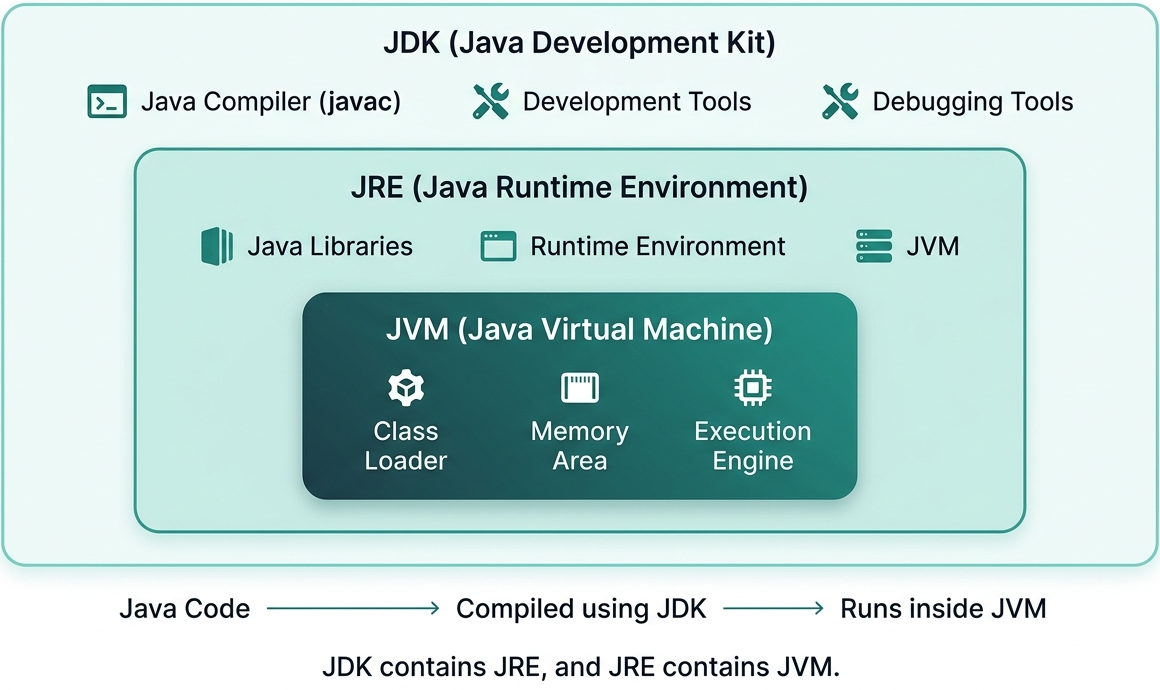
- JVM is inside JRE: JVM (Java Virtual Machine) is a part of JRE. It is that component which actually runs Java programs by converting bytecode into machine code so that the program can work on any system.
- JRE contains JVM: JRE (Java Runtime Environment) is a package that contains JVM along with required Java libraries. It is that environment which is needed only to run Java programs.
- JDK contains JRE: JDK (Java Development Kit) is a complete package that contains JRE inside it. It also includes extra tools like compilers and debuggers that are used for development.
- JDK is for development, JRE is for running programs: JDK is used when we want to write and develop Java programs. JRE is used when we only want to run Java applications on a system.
- JVM is the core engine: JVM is that core part which actually executes the Java code. It works inside both JRE and JDK to make Java programs run on different systems.
JDK = JRE + Development Tools
JRE = JVM + Libraries
Conclusion
JDK, JRE, and JVM are the main parts of the Java platform, and all three work together to run Java programs. The JVM (Java Virtual Machine) is that part which actually executes the Java bytecode and converts it into machine language so the system can understand it. The JRE (Java Runtime Environment) is the environment that is needed to run Java programs, and it includes the JVM along with important Java libraries. The JDK (Java Development Kit) is the complete package that contains the JRE and also provides tools like the compiler and debugger for writing and developing Java programs. Overall, these three components together make it possible to create, compile, and run Java applications on different systems.Frequently Asked Questions
1. What is the main difference between JDK and JRE?2. Does JRE include JVM?JDK is used for developing Java applications, while JRE is used only for running them.
3. Do we need JDK to run Java programs?Yes, JRE contains the JVM along with Java libraries.
4. What is the role of JVM in Java?No. To run Java programs, only JRE is required. However, to develop Java programs, JDK is needed.
5. Why is Java platform independent?JVM executes Java bytecode and provides platform independence.
Java is platform independent because JVM allows Java bytecode to run on any operating system that has a JVM installed.

3 Comments