Encapsulation is one of the important concepts of Object-Oriented Programming (OOP) in Python. It refers to the process of bundling data and the methods that operate on that data inside a single class. Encapsulation also helps control how the data of an object can be accessed or modified from outside the class. Python supports encapsulation using public, protected, and private members. By using encapsulation, you can protect data, control access to attributes, and make programs more organized and easier to maintain. For example, a bank account class can keep the account balance private and provide methods to deposit or withdraw money instead of allowing direct modification of the balance.
Table of Contents
What is Encapsulation in Python?
Encapsulation is the process of wrapping data and the methods that operate on that data into a single unit, usually a class. It also helps control how the data is accessed and modified from outside the class.
For example, consider a BankAccount class. The account balance is important data that should not always be directly modified by other parts of the program. Instead, methods such as deposit() and withdraw() can be used to control how the balance changes.
Example:
# Python program to understand encapsulation
class BankAccount:

    def __init__(self, balance):
        self.__balance = balance

    def deposit(self, amount):
        self.__balance += amount

    def show_balance(self):
        print(self.__balance)

account = BankAccount(5000)
account.deposit(2000)
account.show_balance()
Output:
7000
Explanation:
- A class named BankAccount is created.
- The __balance attribute stores the account balance and is treated as a private member.
- The deposit() method increases the balance.
- The show_balance() method displays the balance.
- The balance is accessed through methods instead of being directly modified from outside the class.
Why Use Encapsulation in Python?
Encapsulation is useful whenever you need to organize data and control how that data is accessed or modified. It helps make programs more secure, structured, and easier to maintain.
- Protects data: Encapsulation helps prevent unintended changes to important data stored inside a class.
- Provides controlled access: Methods and properties can be used to control how attributes are accessed and modified.
- Supports data validation: You can check whether a value is valid before storing it inside an object.
- Improves code organization: Data and the methods that operate on that data are grouped together inside a class.
- Makes programs easier to maintain: Internal implementation can be changed without requiring major changes to the code that uses the class.
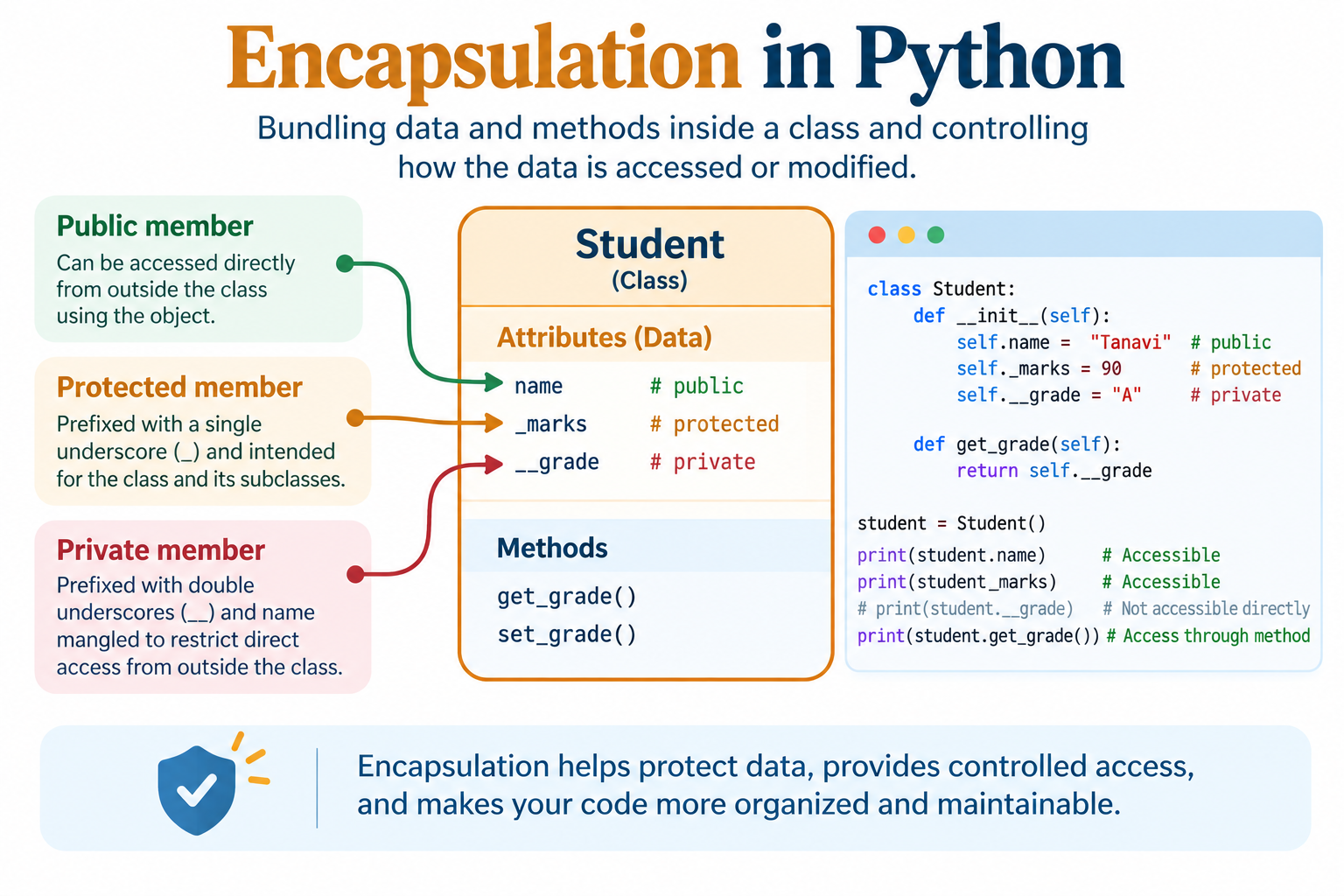
How Encapsulation Works in Python?
Python uses naming conventions and name mangling to indicate how attributes and methods are intended to be accessed.
Python commonly uses three types of members:
- Public members: Members that can be accessed directly from outside the class using the object.
- Protected members: Members prefixed with a single underscore (_) that are intended to be used within the class and its subclasses.
- Private members: Members prefixed with double underscores (__) that are name-mangled to restrict direct access from outside the class.
The number of underscores used before a member's name determines its intended level of access.
Example:
# Python program to understand different members

class Student:

    def __init__(self):
        self.name = "Tanavi"
        self._marks = 90
        self.__grade = "A"

student = Student()

print(student.name)
print(student._marks)
Output:
Tanavi
90
Explanation:
- name is a public member and can be accessed directly.
- _marks is a protected member by convention.
- __grade is a private member and uses name mangling.
- Public and protected members can be accessed using the object.
- Private members are normally accessed through methods or properties defined inside the class.
Access Modifiers in Python
Python does not provide access modifiers in exactly the same way as languages such as Java or C++. Instead, Python uses naming conventions to indicate the intended level of access.
| Type | Syntax | Intended Access |
|---|---|---|
| Public | name | Accessible from anywhere |
| Protected | _name | Intended for the class and subclasses |
| Private | __name | Intended to be accessed within the class |
These access levels are mainly based on Python conventions. Private members also use name mangling to reduce accidental access and naming conflicts.
Public Members
A public member is an attribute or method that can be accessed from inside and outside the class. Public members are created without an underscore before their name.
Syntax:
self.name = value
Example:
# Python program to demonstrate public members
class Student:

    def __init__(self, name, age):
        self.name = name
        self.age = age

student = Student("Tanavi", 20)

print(student.name)
print(student.age)
Output:
Tanavi
20
Explanation:
- A Student class is created.
- The name and age attributes are public members.
- A student object is created.
- The public attributes are accessed directly using the object.
- Python allows public members to be accessed from outside the class.
Protected Members
A protected member is created using a single underscore (_) before its name.
Syntax:
self._name = value
A protected member is intended to be used inside the class and its subclasses. Python does not strictly prevent access to protected members from outside the class.
Example:
# Python program to demonstrate protected members
class Employee:

    def __init__(self, name):
        self._name = name

class Manager(Employee):
    def show_name(self):
        print(self._name)

manager = Manager("Rahul")
manager.show_name()
Output:
Rahul
Explanation:
- The Employee class contains a protected member named _name.
- The Manager class inherits from Employee.
- The show_name() method accesses _name.
- The child class can access the protected member.
- The single underscore indicates that the member is intended for internal use.
Note:
A protected member is not completely private in Python. The single underscore is mainly a convention that tells developers that the member should not normally be accessed directly from outside the class.
Private Members
A private member is created using two underscores (__) before its name.
Syntax:
self.__name = value
Private members are intended to be accessed from within the class. Python uses name mangling for attributes that begin with two underscores.
Example:
# Python program to demonstrate private members
class Student:

    def __init__(self, name, marks):
        self.name = name
        self.__marks = marks

    def show_marks(self):
        print(self.__marks)

student = Student("Tanavi", 90)
student.show_marks()
Output:
90
Explanation:
- A Student class is created.
- The name attribute is public.
- The __marks attribute is treated as private.
- The show_marks() method accesses the private attribute inside the class.
- The method is called using the object to display the marks.
Name Mangling in Python
Python uses a mechanism called name mangling for private attributes that begin with two underscores.
For example:
self.__marks = 90
Python internally changes the name to something similar to:
self._Student__marks
Name mangling helps prevent accidental access and naming conflicts.
Example:
# Python program to demonstrate name mangling

class Student:

    def __init__(self):
        self.__marks = 90

student = Student()
print(student._Student__marks)
Output:
90
Explanation:
- The Student class contains a private attribute named __marks.
- Python applies name mangling to the attribute.
- The internal name becomes _Student__marks.
- The mangled name can technically be used to access the attribute.
- Directly accessing a name-mangled attribute is generally discouraged because it bypasses the intended interface of the class.
Getter and Setter Methods
Getter and setter methods are commonly used to control access to private attributes. A getter method is used to retrieve the value of an attribute, while a setter method is used to modify the value. Setter methods can also be used to validate data before storing it.
Example:
# Python program to demonstrate getter and setter methods
class Student:

    def __init__(self, marks):
        self.__marks = marks

    def get_marks(self):
        return self.__marks

    def set_marks(self, marks):
        if 0 <= marks <= 100:
            self.__marks = marks
        else:
            print("Invalid marks")

student = Student(85)
print(student.get_marks())
student.set_marks(95)
print(student.get_marks())
Output:
85
95
Explanation:
- The __marks attribute is created as a private member.
- The get_marks() method returns the current marks.
- The set_marks() method changes the marks.
- The setter checks whether the marks are between 0 and 100.
- The valid value 95 is stored and displayed.
Example of Invalid Value:
# Python program to validate data using a setter
class Student:

    def __init__(self, marks):
        self.__marks = marks

    def set_marks(self, marks):
        if 0 <= marks <= 100:
            self.__marks = marks
        else:
            print("Invalid marks")

student = Student(80)
student.set_marks(150)
Output:
Invalid marks
Here, the setter prevents an invalid marks value from being stored.
Encapsulation Using @property
Python provides the @property decorator to implement controlled access to attributes in a clean and readable way. It allows a method to be accessed like an attribute. The @property decorator is commonly used with a setter to control how an attribute is modified.
Example:
# Python program to demonstrate encapsulation
# using property
class Student:

    def __init__(self, marks):
        self.__marks = marks

    @property
    def marks(self):
        return self.__marks

    @marks.setter
    def marks(self, value):
        if 0 <= value <= 100:
            self.__marks = value
        else:
            print("Invalid marks")

student = Student(80)
print(student.marks)
student.marks = 95
print(student.marks)
Output:
80
95
Explanation:
- The __marks attribute stores the student's marks.
- The @property decorator creates a getter for marks.
- The @marks.setter decorator creates a setter for marks.
- The setter validates the new value before storing it.
- The marks attribute can be accessed and modified using normal attribute syntax.
Encapsulation with Inheritance
Encapsulation can also be used with inheritance. A protected member can be accessed by a child class because it is intended to be available to subclasses. A private member uses name mangling, so it cannot be directly accessed in the child class using its original name.
Example:
# Python program to demonstrate encapsulation
# with inheritance
class Parent:

    def __init__(self):
        self._protected_data = "Protected Data"
        self.__private_data = "Private Data"

    def show_private_data(self):
        print(self.__private_data)

class Child(Parent):

    def show_data(self):
        print(self._protected_data)

child = Child()
child.show_data()
child.show_private_data()
Output:
Protected Data
Private Data
Explanation:
- The Parent class contains a protected member named _protected_data.
- The Parent class also contains a private member named __private_data.
- The Child class inherits from Parent.
- The child class can directly access _protected_data.
- The private data is accessed through the show_private_data() method provided by the parent class.
Advantages of Encapsulation
Encapsulation provides several advantages when developing Python programs.
- Protects data: Encapsulation helps prevent unintended changes to important data stored inside objects.
- Provides controlled access: Methods and properties can define how attributes should be accessed and modified.
- Supports data validation: Setter methods can check values before storing them.
- Improves code organization: Related data and methods are grouped together inside a class.
- Improves maintainability: Internal implementation can be changed without affecting the external code that uses the class.
Common Beginner Mistakes
1. Directly Accessing a Private Member: Beginners often try to access a private attribute using its original name from outside the class.
Wrong:
class Student:
def __init__(self):
self.__marks = 90
student = Student()
print(student.__marks)
This results in an AttributeError.
Correct:
class Student:
def __init__(self):
self.__marks = 90
def show_marks(self):
print(self.__marks)
student = Student()
student.show_marks()
2. Assuming Protected Members Are Completely Private: A single underscore does not completely prevent access to an attribute.
class Student:
def __init__(self):
self._marks = 90
student = Student()
print(student._marks)
This code works, but _marks is intended to be treated as an internal member.
3. Forgetting Data Validation in Setter Methods: A setter should validate data when the class requires specific values.
Wrong:
def set_marks(self, marks):
self.__marks = marks
This allows invalid values to be stored.
Correct:
def set_marks(self, marks):
if 0 <= marks <= 100:
self.__marks = marks
else:
print("Invalid marks")
4. Trying to Access a Private Member Directly from a Child Class: Private members are name-mangled, so a child class cannot normally access them using their original name.
class Parent:
def __init__(self):
self.__data = "Private Data"
class Child(Parent):
def show_data(self):
print(self.__data)
This raises an AttributeError.
5. Confusing Encapsulation with Complete Data Hiding: Encapsulation does not make data completely inaccessible. Python uses conventions and name mangling to control access and reduce accidental changes.
class Student:
def __init__(self):
self.__marks = 90
student = Student()
print(student._Student__marks)
This can access the name-mangled attribute, but directly using the mangled name is generally discouraged.
Conclusion
Encapsulation is an important concept of Object-Oriented Programming in Python that combines data and the methods that operate on that data inside a class. It provides a way to control how attributes are accessed and modified using public, protected, and private members.
Python also provides name mangling, getter and setter methods, and the @property decorator for implementing controlled access to data. By using encapsulation, you can protect important data, validate values, organize code effectively, and make programs easier to maintain.
Frequently Asked Questions (FAQs)
1. What is encapsulation in Python?
Encapsulation is the process of combining data and the methods that operate on that data inside a class while controlling how the data is accessed and modified.
2. What are the types of members used for encapsulation in Python?
Python commonly uses public, protected, and private members. Public members have no underscore, protected members use a single underscore, and private members use two underscores.
3. What is a private member in Python?
A private member is an attribute or method whose name begins with two underscores (__). Python applies name mangling to such members.
4. What is the difference between protected and private members in Python?
A protected member begins with a single underscore (_) and is intended for use within the class and its subclasses. A private member begins with two underscores (__) and uses name mangling to reduce direct access.
5. What is name mangling in Python?
Name mangling is a mechanism used by Python to change the name of attributes that begin with two underscores. For example, __marks inside the Student class becomes similar to _Student__marks.

0 Comments