The if statement in Python is one of the most fundamental decision-making statements used in programming. It allows a program to execute a block of code only when a specified condition evaluates to True. If the condition is False, the block of code is skipped.
Decision-making is an essential part of every program. Whether you are checking a user's age before allowing access, validating login credentials, or determining if a number is positive or negative, the if statement makes these decisions possible.
In this article, you will learn what an if statement is, its syntax, working, flowchart, practical examples, advantages, limitations, and best practices.
Table of Contents
What is an If Statement in Python?
An if statement is a conditional statement that executes a block of code only when a given condition is true.
Python evaluates the condition first:
- If the condition is True, the code inside the if block executes.
- If the condition is False, Python skips the block and continues executing the remaining program.
Unlike some programming languages, Python uses indentation instead of braces ({}) to define the block of code belonging to the if statement.
Why Do We Use If Statements?
The if statement helps programs make intelligent decisions. Some common applications include:
- Checking Whether a User Is Eligible to Vote: An if statement can check whether a person's age meets the minimum voting requirement. If the condition is true, the user is considered eligible to vote.
- Verifying Login Credentials: An if statement compares the entered username and password with the stored credentials. Access is granted only when the provided details are correct.
- Finding Whether a Number Is Positive or Negative: An if statement can determine whether a number is positive, negative, or zero by evaluating its value against specific conditions.
- Determining Whether a Student Has Passed or Failed: An if statement checks whether a student's marks meet the required passing score. Based on the result, it displays whether the student has passed or failed.
- Checking Inventory Before Placing an Order: An if statement verifies whether a product is available in stock before processing an order. If the item is unavailable, the order can be rejected or delayed.
- Granting or Denying User Permissions: An if statement checks a user's role or access level before allowing specific actions. This helps ensure that only authorized users can access restricted features.
Without if statements, programs would execute every instruction sequentially without making decisions.
Syntax:
if condition:
# Code to execute if condition is True
Explanation:
- if is a reserved keyword.
- condition is any expression that returns either True or False.
- A colon (:) marks the beginning of the block.
- The code inside the block must be indented consistently.
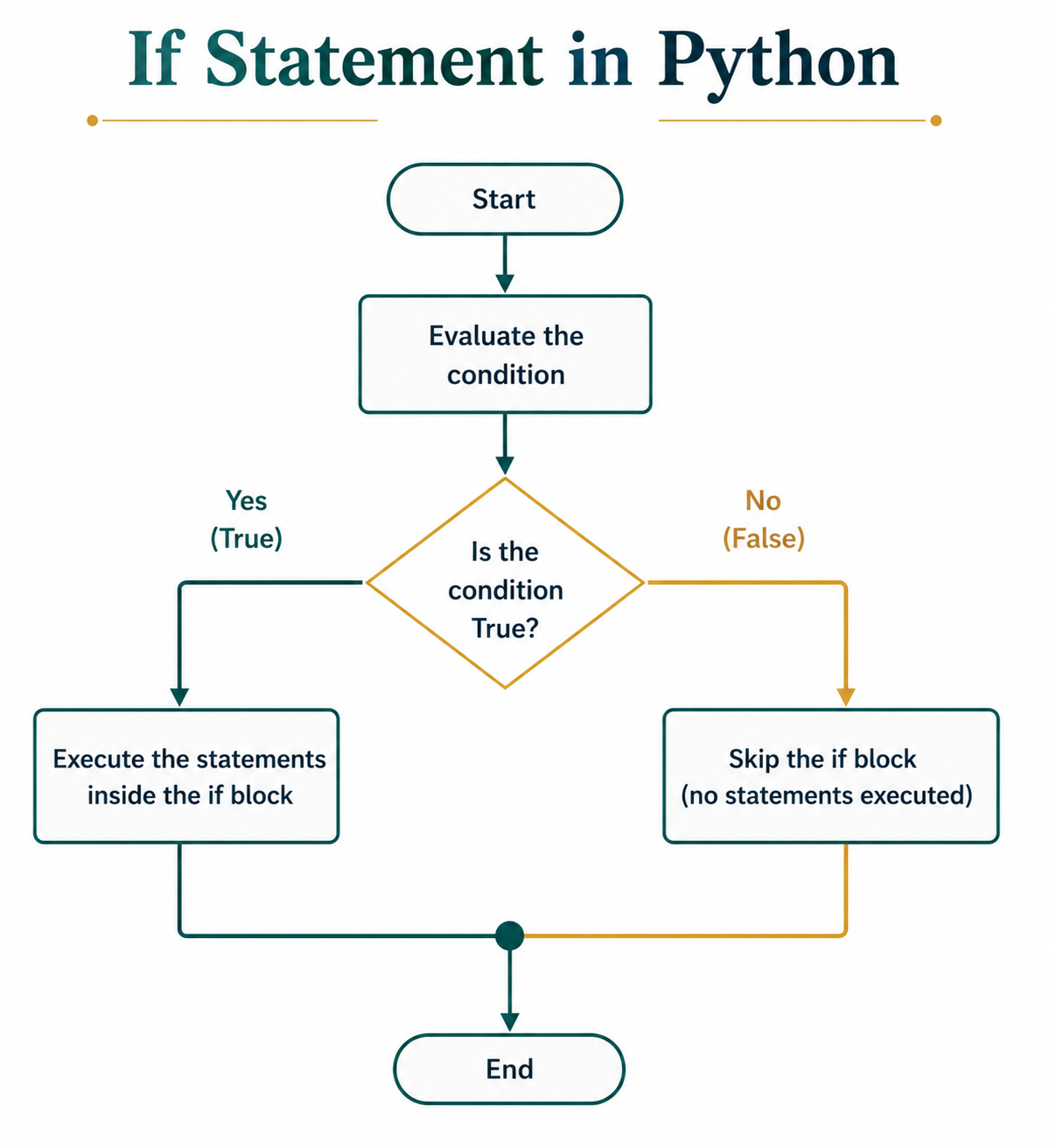
Flowchart of If Statement
The if statement follows a simple decision-making process. It checks whether a given condition is True or False and executes the appropriate code based on the result.- Evaluate the Condition: Python first evaluates the condition written after the if keyword. The condition must return either True or False.
- Execute the If Block: If the condition evaluates to True, Python executes all the statements inside the if block.
- Skip the If Block: If the condition evaluates to False, Python skips the statements inside the if block and continues executing the remaining program.
Example 1: Condition is True
Below is the Python program to implement if statement when the condition is true:
# Python program to demonstrate the
# working of an if statement
# When the condition is True

age = 20

# Check whether the person is an adult
if age >= 18:
    print("You are eligible to vote.")
Output:
You are eligible to vote.
Explanation: The condition age >= 18 evaluates to True, so Python executes the print statement.
Example 2: Condition is False
Below is the Python program to implement if statement when the condition is false.
# Python program to demonstrate the
# working of an if statement
# When the condition is False

temperature = 18

# Check whether it is hot
if temperature > 30:
    print("It is a hot day.")

print("Weather check completed.")
Output:
Weather check completed.
Explanation: Since 18 > 30 is False, Python skips the if block.
Common Mistakes to Avoid
Beginners often make small mistakes while writing if statements. Avoiding these common errors will help you write correct and readable Python code.
- Forgetting the Colon (:): Every if statement must end with a colon (:). Omitting the colon results in a syntax error.
- Using Incorrect Indentation: Python uses indentation to define code blocks. The statements inside the if block must be properly indented; otherwise, the program will produce an error.
- Using = Instead of ==: The assignment operator (=) is used to assign values, while the equality operator (==) is used to compare values. Using the wrong operator can lead to unexpected results or syntax errors.
- Writing an Invalid Condition: The condition in an if statement should always evaluate to either True or False. Invalid or incomplete conditions will cause the program to fail.
- Ignoring Case Sensitivity: Python is case-sensitive, so values such as "Python" and "python" are treated as different. This is especially important when comparing strings in an if statement.`
Conclusion
The if statement is the foundation of decision-making in Python. It enables programs to execute code selectively based on conditions, making applications dynamic and intelligent. From simple comparisons to complex logical expressions, the if statement is used in almost every Python program. By understanding its syntax, working, and best practices, you can write cleaner, more efficient, and more reliable Python code.
Frequently Asked Questions (FAQs)
1. Why is indentation important in an if statement?
Python uses indentation to define the block of code associated with the if statement. Incorrect indentation results in an IndentationError.
2. Can an if statement contain another if statement?
Yes. This is known as a nested if statement and is used when one condition depends on another.
3. What types of conditions can be used in an if statement?
You can use comparison expressions, logical expressions, Boolean values, arithmetic expressions, membership tests (in), identity tests (is), function calls that return Boolean values, and any expression that evaluates to either True or False.
4. What happens if the condition in an if statement is False?
If the condition is False, Python skips the entire if block and continues executing the statements that follow it.
5. Can I put an if statement on a single line?
Yes. If your if block consists of only one simple statement, you can place it on the same line right after the colon.

0 Comments