If you are only getting started with programming, chances are that you have heard about these two languages and thought that they are just two different versions of one and the same language. They are not. In fact, while they share some name parts, JavaScript and Java are entirely different programming languages developed by separate companies for separate uses and according to entirely different rules. While this confusing situation arose due to marketing decisions taken during the 1990s, today it still confuses a lot of people who do not have any prior experience with coding at all.
This article provides an overview of all the main differences between JavaScript and Java in terms of their history, syntax, execution process, purposes, and other factors. Moreover, you will be provided with some simple code samples so that you can compare these two languages even if you have never tried coding anything before. Thus, at the end of the article, you will know what makes JavaScript and Java different from each other and which one suits you better.
Table of Contents
Origin And History
The history of any language often tells why it is what it is now. In the case of JavaScript and Java, they were developed not long ago, one after another, but for different purposes.
- Different Authors: While JavaScript was created by Brendan Eich of Netscape in 1995, Java was invented by James Gosling and his colleagues at Sun Microsystems and released in the same year.
- Initial Goal: Unlike Java, which was created as a general-purpose programming language for the development of standalone applications and embedded systems, JavaScript was created specifically to enable interactive functions in Web pages within a browser environment.
- Naming Similarity: JavaScript had several other names before Mocha, LiveScript, and finally JavaScript, which happened almost at the end of its development process because of marketing issues of the moment.
- Owners: Now Java is owned by Oracle Corporation, while the specification of JavaScript (ECMAScript) is maintained by the ECMA International standards organization.
- Release Time: Java 1.0 was officially released in January 1996, and JavaScript 1.0 was delivered with Netscape Navigator 2.0 in March of the same year.
Syntax And Structure
Syntax refers to the rules that govern how one writes correct code in a programming language. Despite the similarities in the use of curly braces and semicolons, the structural difference is very significant.
- File Requirements: All programs written in Java must exist within a class regardless of the complexity of the task. In JavaScript, one does not have to place his code in any class.
- Entry Point Requirement: In order to run, all programs in Java require a designated method, main. However, no special requirement exists in JavaScript in terms of an entry point.
- Variable Declaration: Java mandates the declaration of data types in all variables. JavaScript enables programmers to declare variables through different keywords without necessarily specifying their data type.
- Semicolon Requirement: It is compulsory for all statements to be followed by semicolons in Java. JavaScript, on the other hand, enables omission of most of the semicolons due to automatic semicolon insertion.
- Verbosity: Compared to JavaScript, Java usually requires many lines of code to achieve the same functionality.
// Java: Hello World Example
public class Main {
public static void main(String[] args) {
System.out.println("Hello, World!");
}
}// JavaScript: Hello World Example
console.log("Hello, World!");
Typing System
This refers to the kind of value that the variable holds, such as text, numbers, or true/ false values. This is among the major differences between the two programming languages.
- Static vs. Dynamic: Java uses static typing; this means that the types of variables are checked prior to execution, whereas JavaScript uses dynamic typing where the variables' types are checked during execution.
- Type Declaration: In Java, you are required to state the type of the variable before use, for instance, 'int' or 'String '. In contrast, the type of a variable in JavaScript is automatically determined by the value used.
- Type Changing: The type of a variable in Java is fixed once the variable has been declared; however, the same variable in JavaScript can be re-declared to a totally different data type.
- Compile-Time Checking: Errors concerning the types of variables are detected in Java even before execution takes place through the compilation process.
- Bug Detection: Due to static typing in Java, the compiler usually detects many errors in the application, while in JavaScript similar bugs are detected later on, and in some cases even after deployment of the application.
// Java: Static Typing
int age = 25;
String name = "Alex";
// age = "twenty-five"; // This would cause a compile-time error// JavaScript: Dynamic Typing
let age = 25;
age = "twenty-five"; // This is completely valid in JavaScript
Execution Environment
Location and way of execution are another major difference. It defines what each of the programming languages can and cannot directly communicate with on the computer.
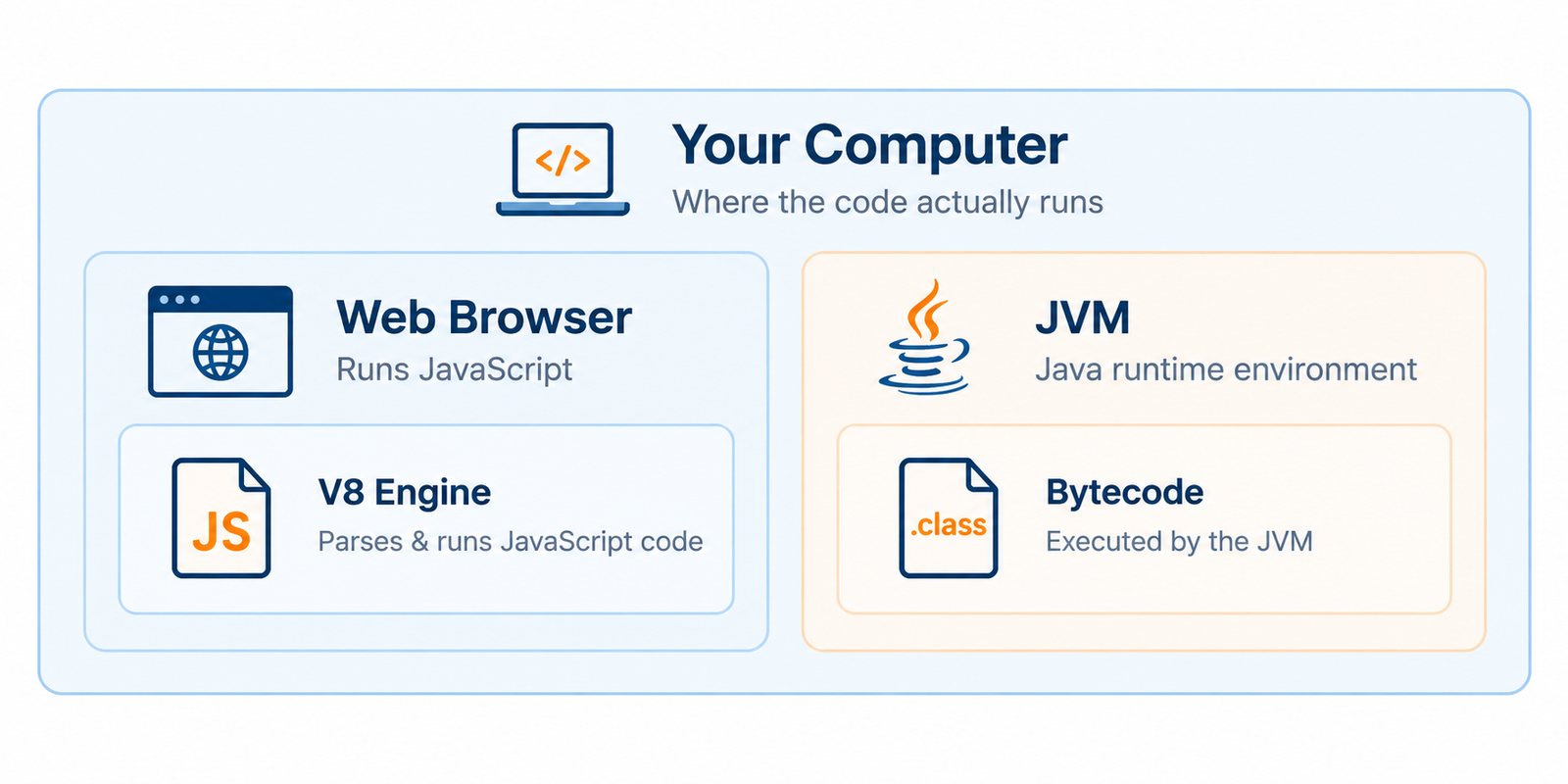
- Browser Vs Machine: The first thing to mention about this matter is the location of code execution. While JavaScript is a programming language created to be executed within a browser, Java uses the so-called Java Virtual Machine, running on any computer.
- Client-Side Language: JavaScript is considered a client-side language because it is executed directly on the client's computer via the browser, even though it may be executed on a server as well.
- Platform Independent: "Write once, run anywhere" - this principle lies at the essence of the Java programming language and means that the same compiled code will work on any platform having the Java Virtual Machine.
- Execution: To execute JavaScript, one needs engines built into browsers (like Google Chrome's V8 engine) or standalone runtimes (like Node.js).
- Access: In contrast to JavaScript, Java gives much more access to computer resources and is less limited by browser restrictions, although there is Node.js now for that purpose.
Compilation Vs Interpretation
The method by which code goes from being written text to being executable code is yet another important technical distinction, and it influences speed and error checking.
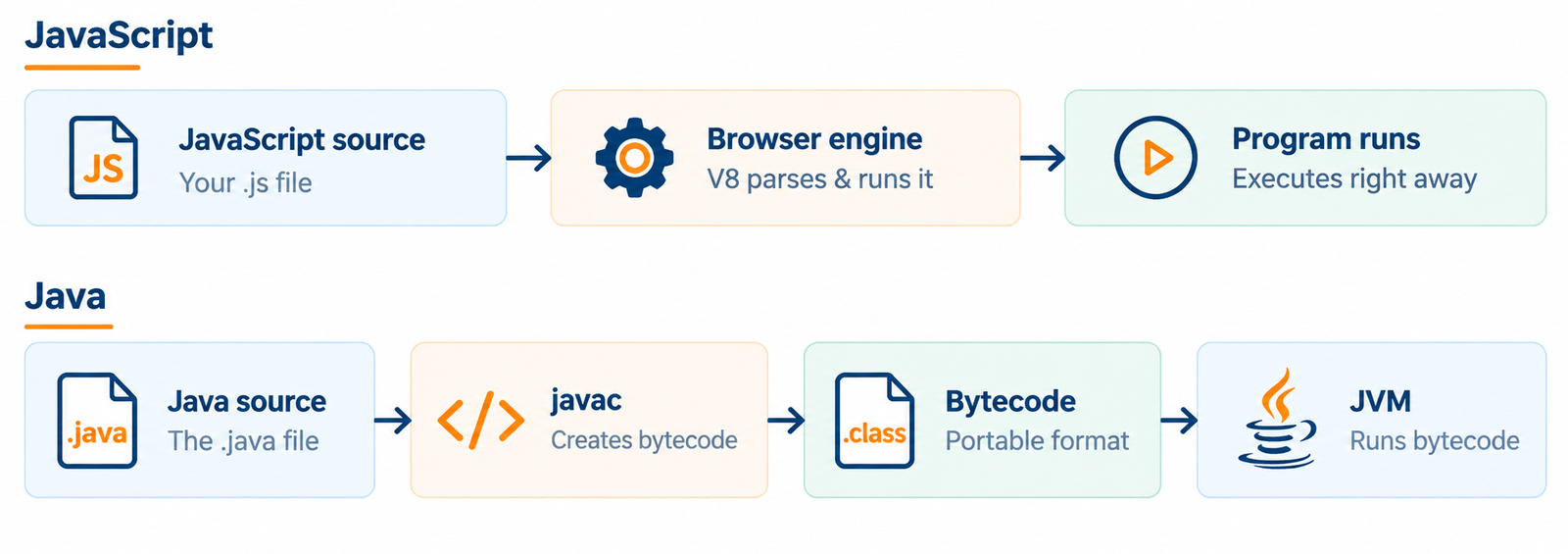
- Compilation Process: Java is a compiled language, so code will go through a step of being converted to bytecode before it is able to be run through the Java Virtual Machine.
- Interpretation Process: JavaScript is typically characterized as an interpreted language, so the browser or interpreter will simply read and interpret the code line-by-line with no additional compilation process required.
- Bytecode Process: The Java compiler will take the .java files and convert them to .class files that contain the bytecode, which can then be read and executed by the Java Virtual Machine.
- Just-In-Time Compilation: The V8 engine of modern JavaScript actually implements a just-in-time compilation process to make this more efficient, thereby making the line between compilation and interpretation somewhat blurred.
- Error Checking: Since Java goes through a step of being compiled, it will typically check for syntax errors before it even executes the code, whereas JavaScript may catch syntax errors only when that particular line of code is being executed.
Concurrency Model
Concurrency is the aspect whereby the programming language manages multiple operations that occur seemingly at the same time in the program. It is useful for a beginner to know the technique used by each language for concurrency.
- Multithreading: Java offers native support for multithreading, meaning the program can perform multiple tasks at once using different processor cores.
- Single-threading: JavaScript in its traditional sense operates using a single thread and, therefore, cannot execute more than one task at any one time in the main execution flow of the code.
- Event Loop Mechanism: JavaScript performs operations that take a long time, such as networking, using an event loop mechanism that makes it seem as though it is not blocked while performing those tasks, even though no multithreading is involved.
- Callbacks, Promises, Async and Await: JavaScript has asynchronous and await concepts that make it possible to execute long-running tasks without blocking the whole application program.
// JavaScript: Handling an asynchronous task
async function fetchData() {
console.log("Fetching data...");
// Simulated wait using a Promise
await new Promise(resolve => setTimeout(resolve, 1000));
console.log("Data received!");
}
fetchData();
Use Cases And Applications
It could be easier for you to choose one based on their usage in the real world to see whether one suits your goals as a beginner or not.
- Web Interactivity: JavaScript is used to make websites interactive by allowing features such as dropdown menu functionality, form validations, sliders, and dynamic content updates without page reload.
- Enterprise Backends: Java is popularly used in making enterprise-level backends, especially for financial institutions such as banks and insurance companies, where reliability and security is key.
- Mobile Application Development: Traditionally, Java was used to develop native Android applications, but nowadays it competes in this field with Kotlin.
- Server-Side Scripting: With the arrival of Node.js, JavaScript is not only used on the client-side but also in server-side scripting to create whole servers and API's.
- Frameworks: Both Java and JavaScript have many frameworks available that can help you with your backend or frontend development, such as Spring and React, respectively.
Performance Characteristics
The speed of execution can determine the suitability of one language over another when carrying out certain types of projects, particularly projects requiring fast execution and processing of large amounts of data.
- Raw Execution Speed: Java executes programs faster than JavaScript for tasks that require high computation, as it is compiled and runs on the Java Virtual Machine.
- Start-up Speed: JavaScript will be able to start faster compared to Java since JavaScript does not have to be compiled separately before being executed.
- Memory Management: Both languages utilize memory management through garbage collection, but the memory management process of Java is more predictable when it comes to large applications.
- Scalability of Large Applications: Java's strongly typed programming nature makes it easy to maintain the speed of execution as the code of the program increases.
- Optimization of Web-related Tasks: The JavaScript engine is optimized to execute programs that are commonly carried out within the web environment.
Learning Curve
However, when considering a language to start learning, how easy it is to learn is very important. Here is a comparison between the two from a beginner's point of view.
- Ease for Beginners: JavaScript is known as being relatively easy to begin with, in the sense that beginners can easily write programs without requiring knowledge of classes or strict typing.
- Ease of Setup: JavaScript needs little to no setup whatsoever as it can run directly on browsers, but Java requires downloading a Java Development Kit for writing even small programs.
- Concepts Introduced: The first thing a beginner learns with Java programming is object-oriented concepts like objects and classes.
- Instant Feedback: With JavaScript, beginners get instant feedback from programs running directly on browser consoles.
- Future Discipline: Although Java programs may require more work at the beginning stages of learning, strict conventions learned during this process will serve beginners well in future learning processes.
JavaScript Vs Java: Quick Comparison Table
For a quick side-by-side reference, here is a summary of the key differences covered above.
| Aspect | JavaScript | Java |
|---|---|---|
| Created By | Brendan Eich (Netscape, 1995) | James Gosling (Sun Microsystems, 1995) |
| Typing System | Dynamically typed | Statically typed |
| Execution Style | Primarily interpreted (JIT-compiled internally) | Compiled to bytecode, run on JVM |
| File Structure | No class required | Must be written inside a class |
| Entry Point | Runs top to bottom, no fixed entry point | Requires a main method |
| Setup Needed | None, runs in any browser | Requires installing a Java Development Kit |
| Concurrency | Single-threaded with an event loop | True multi-threading support |
| Primary Environment | Web browsers, Node.js servers | JVM on desktops, servers, and Android |
| Common Use Cases | Interactive websites, front-end frameworks, Node.js backends | Enterprise systems, Android apps, large-scale backends |
| Performance | Fast startup, optimized for web tasks | Faster for heavy computation, predictable at scale |
| Learning Curve | Easier for beginners | Steeper due to strict structure |
Conclusion
The resemblance in the names of JavaScript and Java can create an illusion that the two are the same, but as this article demonstrates, there is no similarity other than in their names. Java is a statically typed compiled language used mostly in the implementation of enterprise systems and Android programs, whereas JavaScript is a dynamically typed interpreted language that breathes life into static web pages and increasingly becomes popular for server-side coding. It is impossible to speak about any superiority or inferiority of either language because everything is subjective, and the best choice is determined by your needs. If web programming appeals to you and you would like to see quick results, JavaScript would be a perfect choice. For those who prefer structurally complex software and Android programming, Java may be more suitable. However, regardless of the choice you make, programming techniques that you learn will remain the same.
Frequently Asked Questions
1. Is JavaScript a simpler version of Java?
No. Despite the similar name, JavaScript is not a simplified version of Java. They are entirely separate languages with different creators, different syntax rules, and different typical use cases.
2. Can I use my Java knowledge to learn JavaScript faster?
Some core programming concepts, like loops, conditionals, and functions, will transfer over and give you a head start. However, you will still need to learn JavaScript's own syntax, its dynamic typing system, and how it interacts with web browsers.
3. Which language should a complete beginner learn first?
It largely depends on your goals. If you want to build websites quickly and see instant results, JavaScript is usually the easier starting point. If you're interested in structured software development or Android apps, Java may be a better first step.
4. Can JavaScript do everything Java can do?
Not exactly. While JavaScript has expanded significantly with tools like Node.js to handle backend and server tasks, Java still holds an edge in areas like large-scale enterprise systems, high-performance computing, and native Android development.
5. Do I need to install any software to start coding in JavaScript?
No separate installation is required to begin. You can write and run basic JavaScript directly in any modern web browser's developer console. Java, on the other hand, requires you to install a Java Development Kit before you can compile and run programs.

0 Comments